About this template
A rental property can look great on a listing and lose money in practice. This calculator helps you run the numbers on a specific deal before you commit, using your own estimates for financing, rent, vacancy and every operating cost.
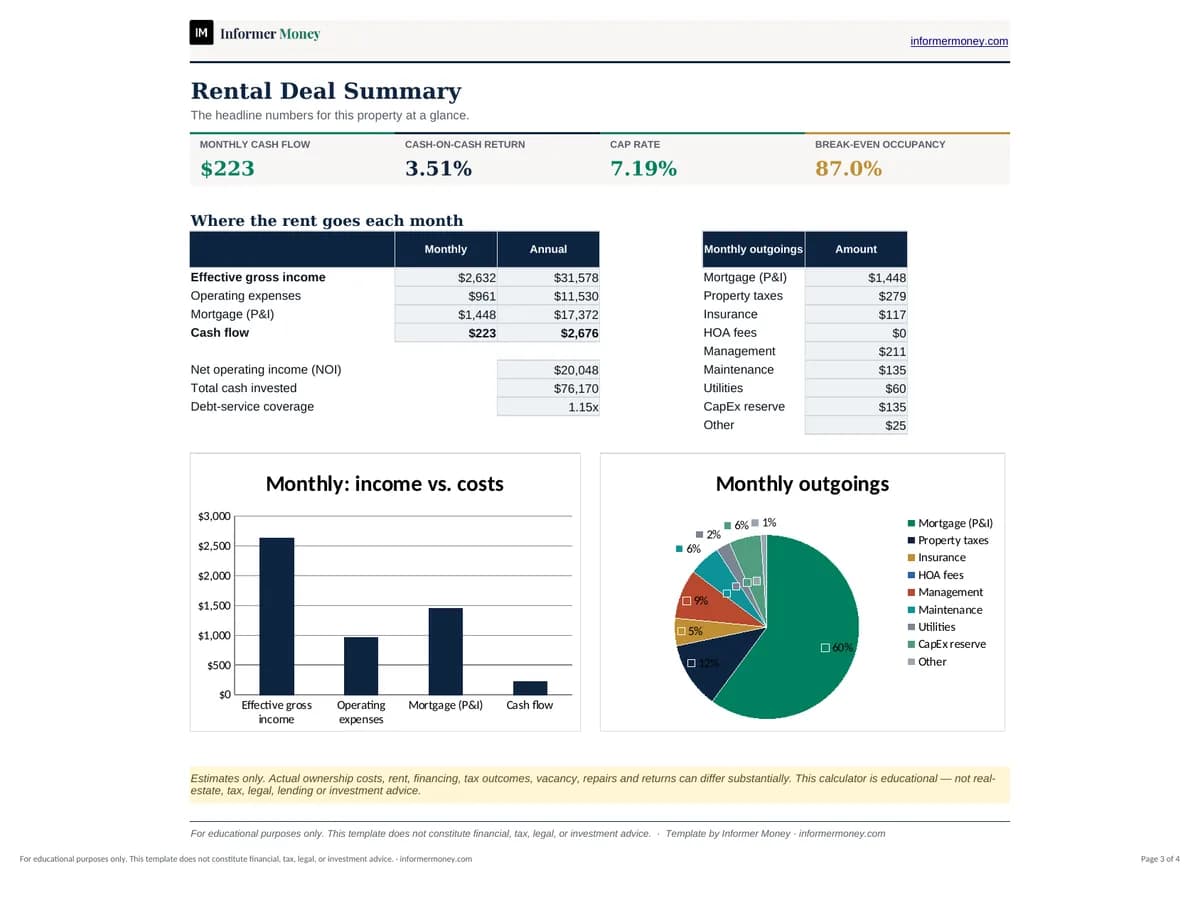
Enter the purchase and loan details, expected income and expenses, and the workbook calculates the monthly mortgage payment, gross and effective income, operating expenses, net operating income, annual cash flow, cash-on-cash return, cap rate and break-even occupancy — with a one-page summary dashboard. Try pessimistic scenarios too: real costs and returns can differ substantially.
Who it's for
- First-time and prospective landlords
- Investors comparing rental properties
- Homeowners considering renting out a property
What's included
- Purchase inputs: price, down payment, closing costs, repairs, interest rate and loan term (loan amount calculated)
- Income inputs: monthly rent, other income and vacancy rate
- Expense inputs: taxes, insurance, HOA, management, maintenance, utilities, CapEx reserve and other
- Mortgage payment, gross and effective income, operating expenses and NOI
- Annual cash flow, cash-on-cash return, cap rate, break-even occupancy, DSCR and more
- Summary dashboard with charts and a clear educational disclaimer
How to use it
- 1
Open the Property Analysis sheet and replace the example deal with the property you’re evaluating.
- 2
Use real loan estimates and insurance and tax figures where you can.
- 3
Research comparable rents and a realistic vacancy rate for the area.
- 4
Review cash flow, cash-on-cash return, cap rate and break-even occupancy.
- 5
Re-run the numbers with lower rent, higher vacancy and higher costs before deciding.