About this template
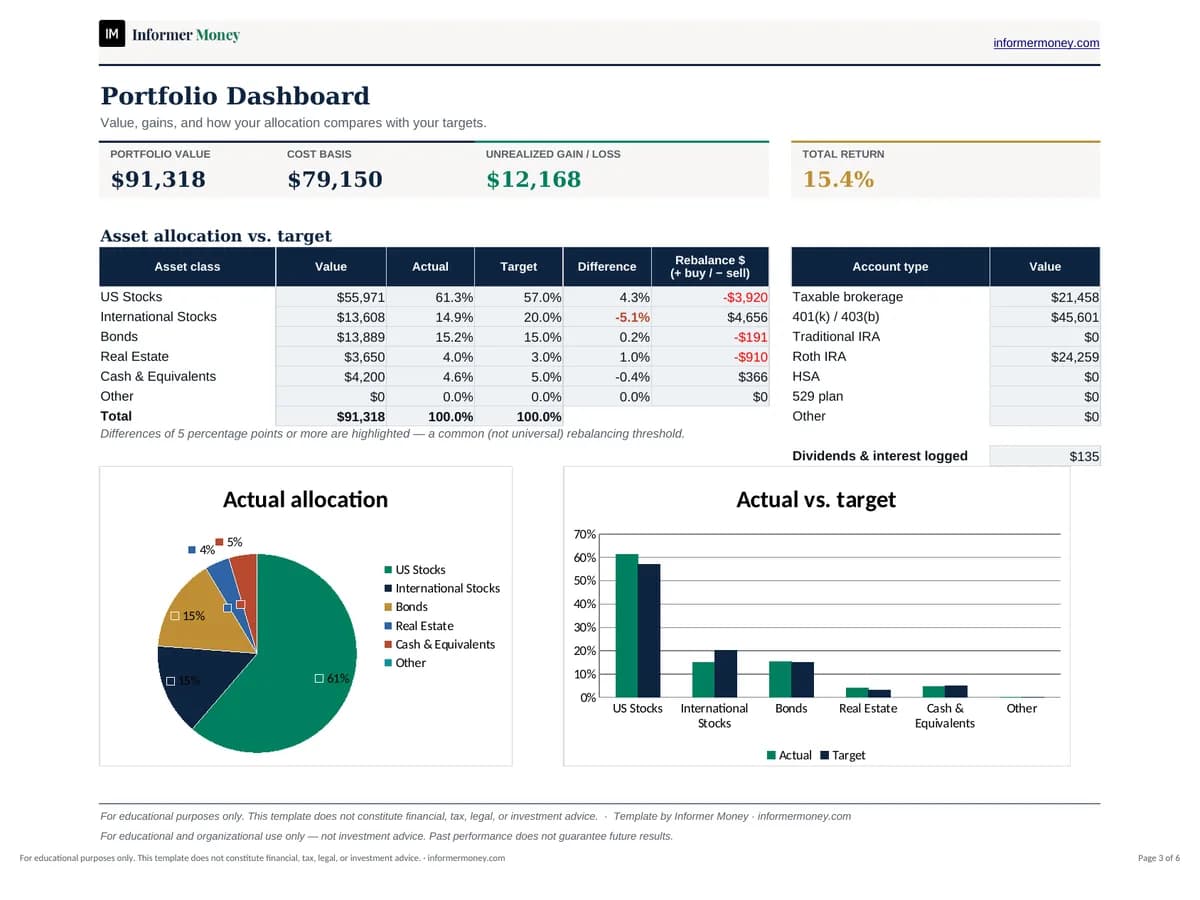
When your investments are spread across a 401(k), an IRA and a brokerage account, it’s hard to see the whole picture. This workbook brings every holding into one table so you can see your total value, unrealized gains and how your allocation compares with the mix you intended.
Enter quantities, cost basis and current prices, set a target allocation, and the dashboard shows your allocation by asset class and account, highlights drifts of five percentage points or more, and estimates how much to buy or trim to rebalance. Prices are entered manually — Google Sheets users can swap in GOOGLEFINANCE formulas for supported tickers.
Who it's for
- Long-term, buy-and-hold investors
- Anyone with investments across several accounts
- Investors who want a simple rebalancing check
What's included
- Holdings table: ticker, name, asset class, account type, quantity, cost basis and current price
- Automatic current value, unrealized gain/loss and return for each holding
- Target vs. actual allocation and rebalancing difference for each holding and asset class
- Portfolio value summary and value by account type
- Allocation pie chart and actual-vs-target bar chart
- Optional transaction log for buys, sells, dividends and other cash movements
How to use it
- 1
On the Holdings sheet, replace the examples with one row per holding in each account.
- 2
Enter quantity and total cost basis from your broker statements.
- 3
Type the latest price for each holding (or use GOOGLEFINANCE in Google Sheets where supported).
- 4
Set target allocations so they total 100%.
- 5
Review the Dashboard and update prices monthly or quarterly.