
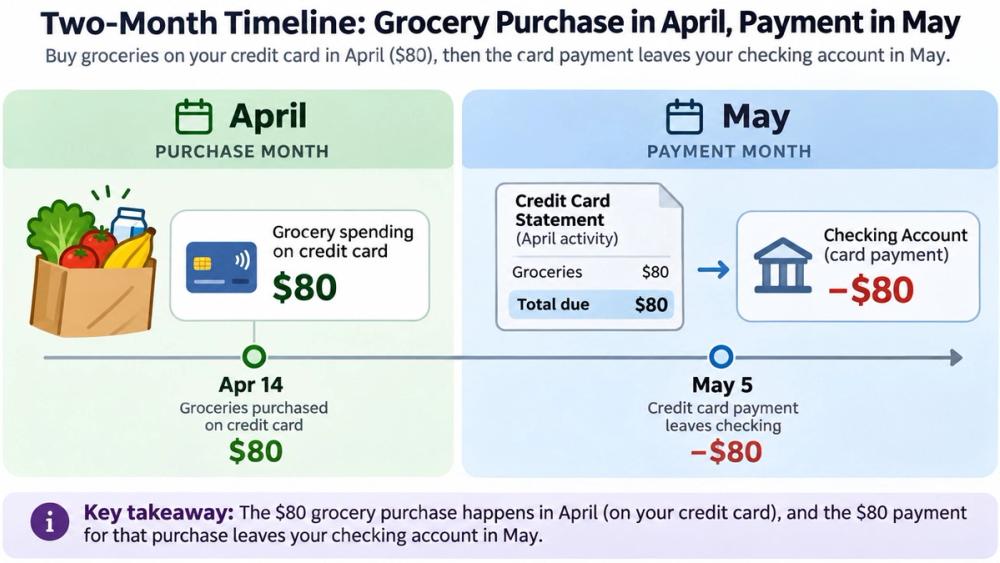
An $80 grocery trip goes on a credit card in April. When the household pays the card bill in May, the same $80 can show up in the tracker again. A tracker records what you spent and gives you a starting point for deciding what to budget next month. Avoid these common mistakes when tracking monthly expenses to catch missing purchases, duplicate entries, and bills that come only once a year.
How to avoid these common mistakes when tracking monthly expenses across accounts
A checking account statement shows what cleared that account. Getting a complete picture takes a few more records and categories you can apply consistently.
Mistake 1 — Relying on one account or on memory
Gather activity from each checking account, credit card, and payment app you use to spend. Then add cash purchases from receipts or a quick note in your phone. For example, a cash lunch and a streaming subscription charged to a credit card can both escape a review of checking activity. Save receipts in one place or jot down cash purchases while they’re still fresh.
Mistake 2 — Creating too many categories or trusting automatic labels
Use broad categories to start, such as housing, groceries, dining out, and transportation. If an app files a supermarket purchase under “shopping,” move it to groceries if that’s what you bought. Split a category when the detail helps you make a decision. For example, separate delivery from meals eaten out if you want to see how much delivery costs each month.
Mistake 3 — Double-counting credit card payments and transfers
Count each purchase once in your monthly spending total. Keep card payments and transfers visible so you can also see where your money moved.
Record card purchases once, even when the bill comes next month
Put the $80 card purchase under groceries in April. When you pay the card bill in May, mark the payment as a transfer from checking to the card account. This keeps the payment out of May’s grocery total. If the bill also covers an older balance, put the full amount due on your bill calendar. The tracker shows which month the purchase belongs in. The calendar tells you when to have the cash available.
Label savings transfers and ATM withdrawals consistently
Moving $50 to savings is a transfer you can keep visible under savings in your budget. Treat an ATM withdrawal the same way when you track individual cash purchases. If you withdraw $40 and spend $12 at a market, enter $12 as spending and track the remaining $28 as cash on hand.
Mistake 4 — Leaving annual and seasonal bills out of the monthly budget
Rent is generally a fixed expense because the amount stays steady each month. Groceries are variable because the total changes from month to month. An annual insurance premium comes less often and can still have a predictable amount and due date.
Check past statements and plan for the next due date
Look through past statements for insurance renewals, registration fees, and seasonal costs. If a $360 insurance bill is due in 12 months, setting aside $30 a month will cover it. If it’s due in six months and you’re starting from zero, you’d need $60 a month. If you’ve already saved part of the bill, divide the amount still needed by the months remaining. Put the set-aside in your budget as planned savings and record the full bill as actual spending when you pay it.
Mistake 5 — Tracking spending without reviewing the totals
A weekly check keeps your spending records accurate. A month-end review helps you decide whether to change your spending or revise the plan.
Check the tracker weekly against statements and receipts
Match the week’s entries to your account activity and receipts. Add missing cash purchases, match transfers across accounts, and correct mislabeled transactions before they distort your category totals. If a purchase appears in both a manual entry and an app import, keep one matching record.
Compare planned and actual spending at month-end
Suppose April groceries total $460 against a $400 plan, including that $80 card purchase. Check whether the $60 difference came from a one-time pantry restock or reflects what groceries now cost. A pantry restock may explain one unusually expensive month. If the gap keeps showing up, revisit the grocery budget and look for room elsewhere in the plan.
The spreadsheet shows planned and actual spending side by side. You can download it for free after joining the newsletter.
FAQs about tracking monthly expenses
Can I track expenses before I have a budget?
Start by recording a full month of actual spending. Use the totals to set your first budget and mark any bills due later in the year.
How far back should I look for irregular expenses?
A few months of statements can reveal recurring patterns. Check a full year if records are available so you can catch annual renewals and seasonal bills.
How do I record a refund that arrives the next month?
One option is to subtract the refund from the original spending category in the month the credit posts. For a $20 refund on April clothing, enter −$20 under clothing in May if that’s when the credit posts. Add a note with the original purchase date so the drop in May spending makes sense.
Do I need an app to track monthly expenses?
A notebook or spreadsheet works if you record the date, amount, and category and check those entries against receipts and statements.
Conclusion
To avoid these common mistakes when tracking monthly expenses, start with the records you already have. Check this month for a missing purchase, a duplicate payment, or a bill due later in the year. Use what you find to update next month’s budget.