About this template
Should you pay off the smallest balance first for quick wins, or the highest interest rate first to save money? This planner answers that with your own numbers instead of rules of thumb.
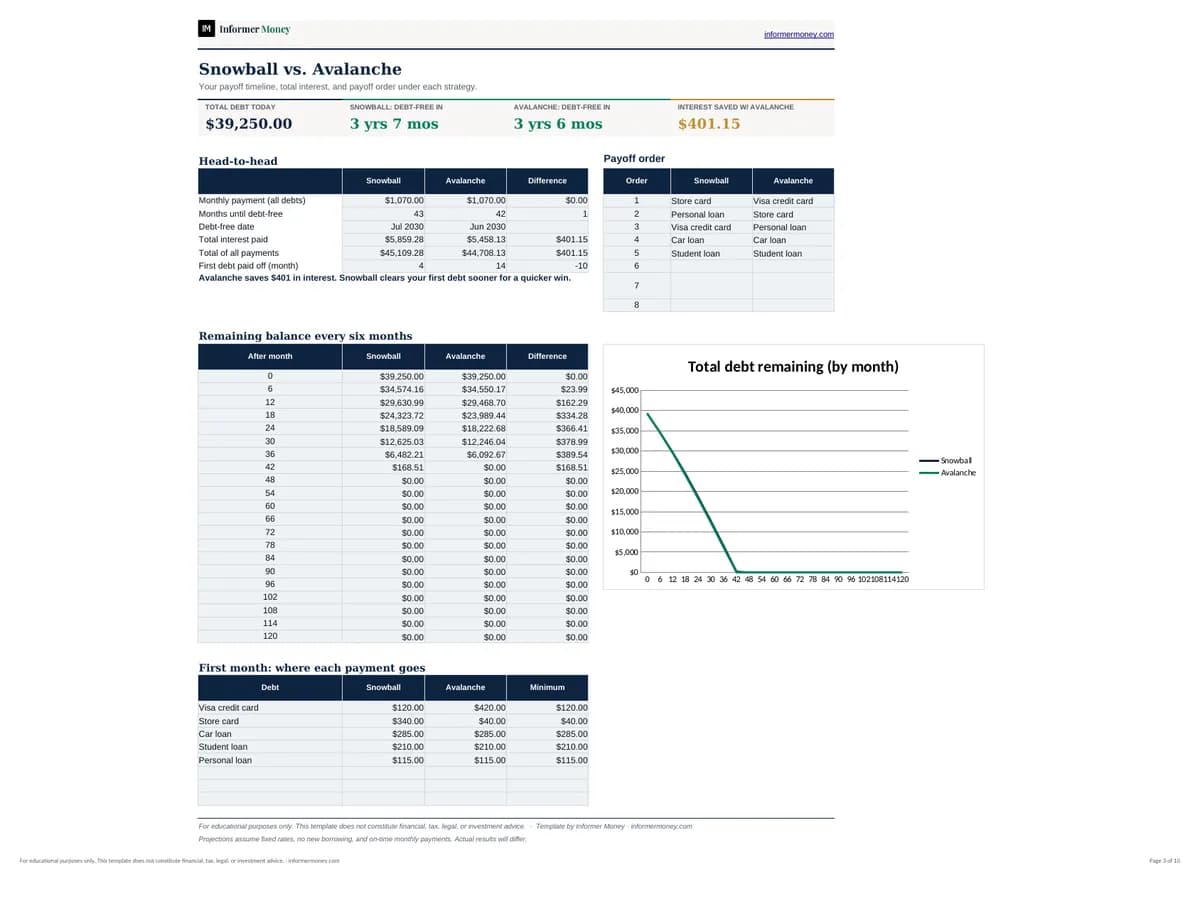
Enter up to eight debts and the extra amount you can pay each month. The workbook builds a full month-by-month schedule for both strategies — every interest charge, minimum, extra payment and remaining balance — and rolls each paid-off debt’s payment onto the next one automatically. The dashboard shows your debt-free date, total interest, payoff order and how much the Avalanche method saves.
Who it's for
- Anyone juggling credit cards, car loans, student loans or personal loans
- People deciding between the Snowball and Avalanche methods
- Households planning how much extra to put toward debt each month
What's included
- Debt list for up to 8 debts with balance, APR and minimum payment
- Automatic Snowball (smallest balance) and Avalanche (highest APR) payoff order
- Month-by-month schedules for up to 30 years, with payments that roll over as debts are paid off
- Dashboard with debt-free date, total interest, total paid and interest saved
- Remaining-balance chart and first-month payment allocation for each strategy
- Formulas only — no macros — so it works in Excel, Google Sheets and Numbers
How to use it
- 1
On “Your Debts”, replace the examples with each debt’s name, balance, APR and minimum payment.
- 2
Enter the extra amount you can pay each month and your first payment month.
- 3
Open the Dashboard to compare debt-free dates and total interest.
- 4
Check the Snowball and Avalanche schedules to see where each payment goes.
- 5
Choose a strategy, then update balances every few months to stay on track.