About this template
Zero-based budgeting is simple: income minus everything you assign equals zero. That doesn’t mean spending it all — savings, extra debt payments and goals count as jobs too. The point is that nothing is left unplanned.
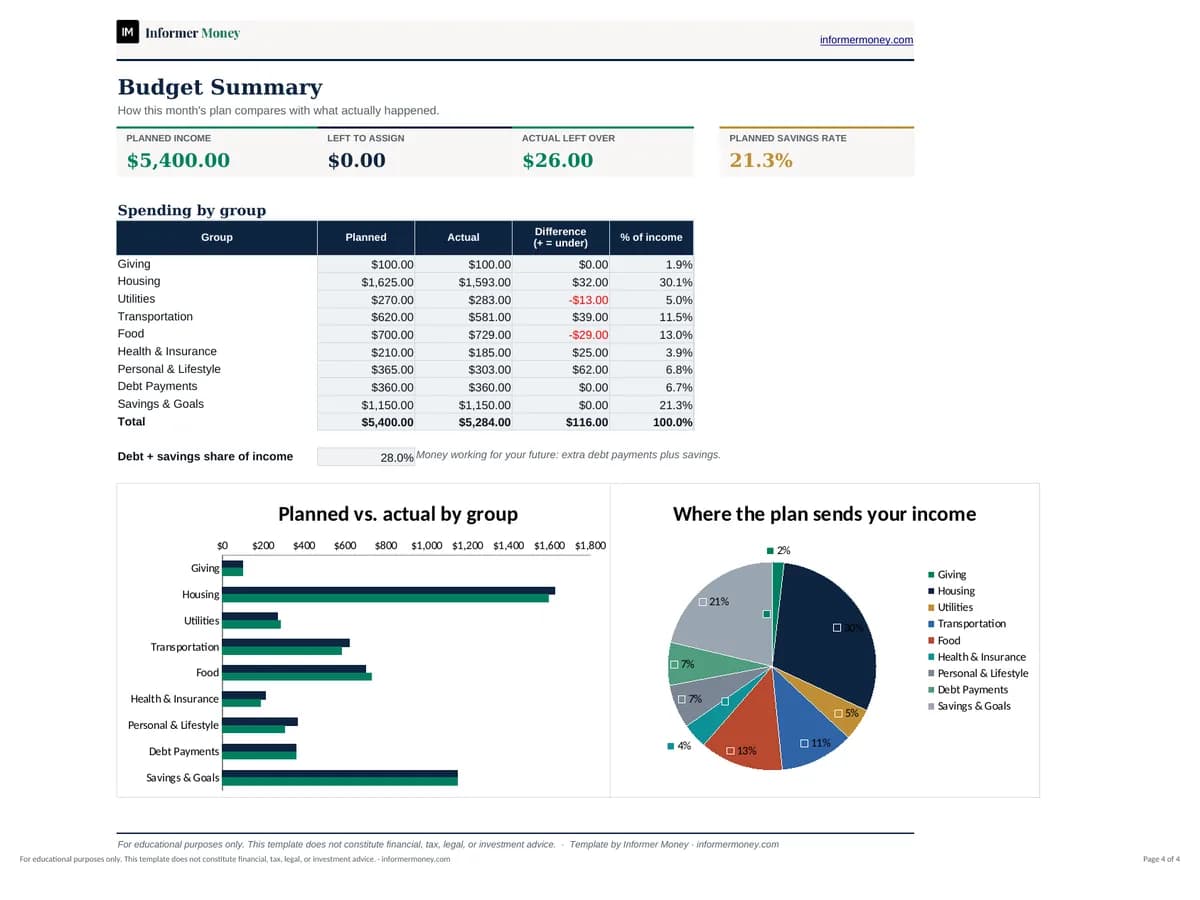
This spreadsheet does the arithmetic for you. Plan each category, log what you actually spend through the month, and a live check tells you whether every dollar has a job. A summary sheet compares plan and reality by group, with charts that make overspending obvious at a glance.
Who it's for
- Anyone starting a budget for the first time
- Households who want to see where every paycheck goes
- People paying down debt or building an emergency fund
- Irregular earners who budget month by month
What's included
- Monthly budget with Income plus nine spending groups and 35+ editable categories
- Planned, Actual and Difference columns, plus each line’s share of income
- Live “Left to assign” check that turns green at exactly $0
- Summary sheet with savings rate, group totals and planned-vs-actual charts
- Realistic example month you can overwrite
- Step-by-step “How to Use” sheet and a clear input/formula color key
How to use it
- 1
Open the “Monthly Budget” sheet and set the month in the yellow cell.
- 2
Enter your expected take-home income in the Income section.
- 3
Assign a planned amount to each category — rename, add or delete categories to fit your life.
- 4
Adjust until “Left to assign” reads $0.00.
- 5
Log actual income and spending as the month goes, then review the Summary sheet.
- 6
Duplicate the Monthly Budget tab to start next month.